When your office bean-to-cup machine starts acting up, staff complaints follow fast. This guide covers the common faults in commercial bean-to-cup and espresso setups, what causes them, and what you can check before you call a technician. Commercial machines work harder than home units, so routine care matters even more.
If a problem is still there after you’ve worked through a section’s checks, beverage equipment repair is your next step.
1. Grinder Not Working, Stuck, or Making Unusual Noise
A grinder fault is one of the most disruptive issues on a commercial machine. Common causes include oily or caramelized beans, a grind setting that needs adjusting, or a foreign object in the hopper.
What to check first:
- Empty the bean hopper completely and inspect for debris or clumped beans.
- Check the grind setting, and follow your machine’s manual when adjusting it.
- Reload with fresh beans and run a test pour.
When it needs a technician: If grinding resumes but stops immediately after starting, that’s not a bean issue. A burr set that’s worn through or a motor fault won’t resolve with any user adjustment. Schedule a service call.
2. Coffee Tastes Weak, Bitter, or Off
Taste problems in a commercial coffee machine often come from grind size, limescale buildup, or stale beans. Here’s what each one looks like:
- Grind size: A grind that’s too coarse pulls weak, watery coffee. Too fine, and you get an over-extracted, bitter result. Adjust the grind one step at a time and pull a test shot after each change.
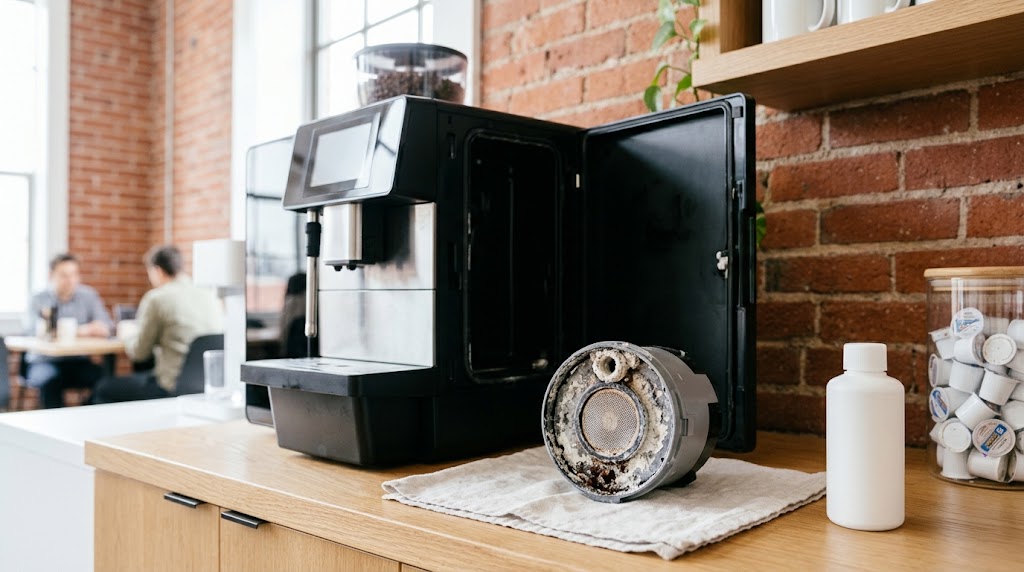
- Limescale reducing brew temperature: Mineral deposits in the brew group can keep the water from reaching the right temperature at the point of dispense. That’s why descaling matters for taste, not just flow.
- Heavy use accelerating scale buildup: A machine that brews all day collects mineral deposits faster than one used occasionally. Your descaling frequency should reflect your actual daily use and local water hardness, and a busy office machine may need descaling more often than a standard schedule suggests.
- Stale beans: Beans left sitting in a hopper go stale, so rotate stock regularly.
Check your machine’s manual for compatible descaling products rather than guessing, because the wrong descaler can damage seals. You can also call Denver Beverage at 303-295-3737 for guidance on what suits your machine.
3. Coffee Dispensing Slowly or Stopping Mid-Pour
Slow or interrupted flow on a commercial bean-to-cup machine often has one of two root causes, and they call for different responses:
- Root cause A, a blocked flow path: A grind that’s too fine, or limescale in the brew group or thermoblock, creates a clog that restricts water movement. To check, run a descale cycle, then coarsen the grind by one step and pull a test pour.
- Root cause B, a failing thermoblock or pump: If you’ve already descaled and adjusted the grind and coffee is still slow or cold, the problem isn’t a blockage. The thermoblock or pump may be failing, and another descale cycle won’t fix it.
This distinction matters because it tells you whether you have more to try yourself or need a technician. A machine that’s been descaled, grind-adjusted, and still underperforms is telling you something a service visit needs to diagnose.
4. No Power or Machine Cuts Out Mid-Cycle
Before assuming an internal fault, check the power supply. Office kitchens often have GFI (Ground Fault Interrupter) protected outlets near sinks and prep areas. A tripped GFI outlet is a different cause from a tripped breaker, and it’s easy to miss if you only check the panel. Here are the checks to run, starting with the quickest:
- Look for the test/reset button on the outlet itself. If the GFI has tripped, pressing reset restores power without touching the breaker panel.
- Check the breaker as well. A machine that draws significant current at startup can trip a breaker that’s shared with other equipment.
- If the machine shows an overvoltage or undervoltage warning on its display, that’s a supply-side issue, not an internal fault.
- If it cuts out after running for a while, make sure nothing is blocking the airflow around it, since a blocked airway can trigger a thermal cutout.
When it needs a technician: If the machine trips repeatedly after a reset, the fault is likely inside the unit, not the outlet. Don’t open the machine. Schedule service.
5. Display Showing Error Codes or Warning Messages
Not all error codes mean the same thing, and in an office with several machines, you need to tell a maintenance alert from a real fault fast.
Alerts you can clear yourself:
- Empty bean hopper
- Empty water tank
- Drip tray full
- Replace water filter indicator
- Brewing unit not seated correctly
Check these first, because most are exactly what they say.
Fault codes that need a technician: These point to an internal component failure, not a consumable or routine maintenance item. Topping up beans or emptying the drip tray won’t clear them.
A code that keeps coming back: If one machine in an office bank throws the same code, clears on reset, and returns soon after, that isn’t a maintenance alert. It’s a service signal. When one machine cycles through the same fault while the others run cleanly, it needs a technician, not another reset.
6. Milk System Faults: No Froth, Weak Froth, or Sputtering
If your machine has an integrated milk system or automatic frother, this section is for you. If it doesn’t, you can skip ahead.
In a commercial office, the milk steam wand or frother is easy to neglect in daily cleaning. Dried milk residue builds up quickly and blocks the steam path. It matters more at office volumes, because the machine cycles through milk programs many more times each day.
What to check first:
- Run the machine’s built-in milk circuit cleaning cycle. Skipping it lets milk residue build up and leads to sputtering, weak froth, or no uptake.
- Check the milk tube. A kinked or improperly seated tube causes the same symptoms.
When it needs a technician: If the machine has been cleaned and still produces weak or no froth, the internal milk circuit may need professional flushing. That isn’t something an operator can do.
What a Recurring Fault Is Telling You
The clearest signal in a commercial setting is a fault that keeps coming back. A fix that holds is probably a genuine fix. If the same fault returns within a week, it’s a service problem, not a user one.
Denver Beverage has 13 CFESA-trained service technicians who service coffee brewing equipment on the Front Range and the I-70 corridor, with 7-day service coverage and a 24-hour service response. All repairs carry a 90-day labor warranty.
Get a Technician on Your Bean-to-Cup Machine
If your machine is mid-fault right now, call Denver Beverage at 303-295-3737 or request a service call. And if you’re evaluating a new bean-to-cup coffee program for your office, Denver Beverage offers free coffee taste testing, and the team can talk through your office coffee service options at the same number.
Frequently Asked Questions
Why does my bean-to-cup coffee machine keep cutting out?
A tripped GFI outlet or breaker is the most common cause. Office kitchens often have GFI-protected outlets near sinks. A tripped GFI has its own reset button on the outlet face, so check it first, then the breaker panel. If the machine keeps tripping after both are reset, schedule a service visit instead of resetting again.
How often should a commercial bean-to-cup machine be descaled?
More often than a default schedule suggests, because heavy use builds up mineral deposits faster. The right interval depends on how much the machine is used each day and how hard your local water is, and sooner is better if you notice slow flow or weak coffee. The Denver Beverage team can talk through your setup at 303-295-3737.
Why is my coffee coming out weak even after I adjusted the grind?
Limescale buildup is the likely cause, because it reduces your brew temperature. The machine is heating the water, but mineral deposits mean the water isn’t reaching full brewing temperature by the time it hits the grounds. Run a descale cycle, and if the coffee is still weak afterward, call for a technician.
What’s the average lifespan of a commercial bean-to-cup machine?
It depends heavily on daily use and maintenance history. A machine that gets regular preventive maintenance will generally last longer than the same model running without it, because a technician can catch worn components before they fail. Denver Beverage’s own technicians handle preventive maintenance, so call 303-295-3737 to ask about your equipment.
Can Denver Beverage service a bean-to-cup machine it didn’t supply?
That depends on the machine. Denver Beverage installs and services De Jong Duke and Bravilor Bonamat bean-to-cup machines. For any other machine, call 303-295-3737 and the team can tell you whether it can be serviced before you book a visit.
Why does my machine show the same error code even after I clear it?
Because the underlying problem hasn’t been fixed. A code that keeps returning after a reset is a service signal, not a user issue, so don’t keep resetting. In an office with several machines, it’s easy to mistake a recurring fault for a routine maintenance alert because clearing it takes seconds. Contact Denver Beverage to get a technician on-site.